
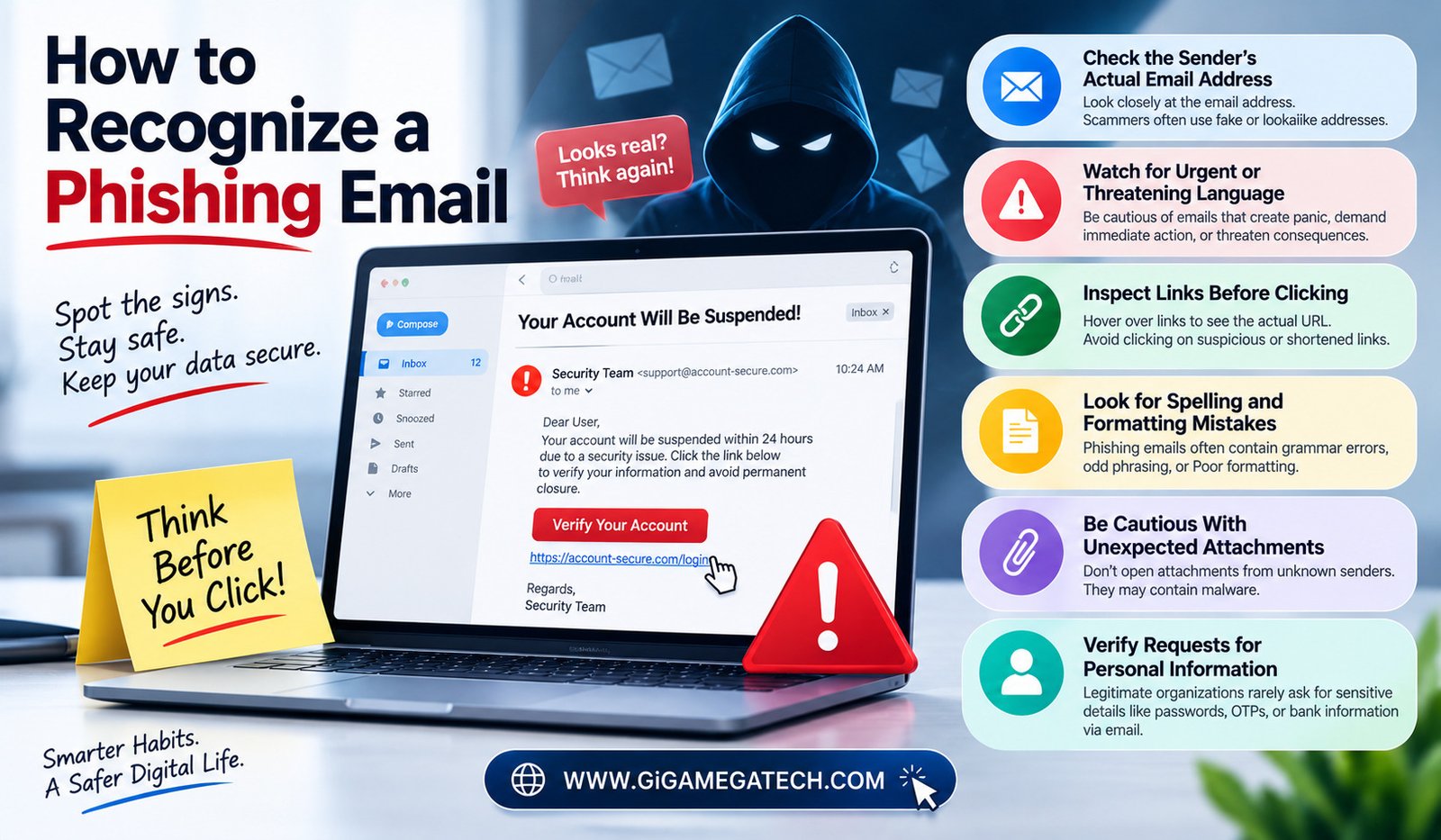
A single careless click on the wrong email can lead to stolen passwords or worse. Learning how to recognize a phishing email is one of the simplest ways to protect yourself online.
Phishing emails have grown more convincing over the years, often mimicking real companies closely. This guide breaks down the warning signs worth checking before you click anything.
Why Phishing Emails Keep Working
Phishing relies on urgency and trust, pushing people to act quickly before thinking the message through carefully.
Attackers often mimic banks, delivery services, or workplace tools, since these messages blend easily into an already crowded inbox.
A few reasons phishing remains effective:
- Messages are designed to trigger fear or urgency
- Fake emails increasingly copy real company branding closely
- People check email quickly, often without close inspection
- Mobile screens make small warning signs easier to miss
Check the Sender’s Actual Email Address
The display name shown in your inbox can say anything, even “Your Bank” or “Support Team,” regardless of the actual sending address behind it.
Always check the full email address, not just the name shown by default. Legitimate companies use consistent, official domain names for their communications.
Look closely for slightly altered domains, like a company name spelled with an extra letter or a different ending than the real website uses.
What to check
- Tap or hover over the sender’s name to reveal the full address
- Compare the domain to the company’s official website address
- Watch for extra characters, misspellings, or unusual endings
Watch for Urgent or Threatening Language
Phishing emails often create a false sense of urgency, claiming your account will be suspended or a payment failed unless you act immediately.
This pressure is intentional, designed to make you click a link or provide information before pausing to think it through carefully.
Legitimate companies rarely demand immediate action through email alone, especially for serious account or payment issues.
Common phrases to watch for
- Claims your account will be closed within hours
- Warnings about suspicious activity requiring instant verification
- Messages demanding payment or personal details right away
Inspect Links Before Clicking
Phishing emails often include links that look legitimate at first glance but lead somewhere completely different once clicked.
On a computer, hovering your mouse over a link, without clicking, usually reveals the actual destination address at the bottom of your screen or browser.
On mobile devices, a long press on the link often shows a preview of the actual destination address before you commit to opening it.
What to check
- Hover over links on desktop to preview the real destination
- Long press links on mobile to see the actual address
- Compare the domain shown to the company’s known official website
Look for Spelling and Formatting Mistakes
While phishing emails have become more polished over time, many still contain small spelling errors or awkward phrasing that legitimate companies rarely produce.
Formatting inconsistencies, like mismatched fonts, stretched logos, or odd spacing, can also signal a message was not created by the company it claims to represent.
These small formatting mistakes often stand out once you know to look for them, even in otherwise convincing phishing attempts.
What to check
- Unusual spelling or grammar mistakes throughout the message
- Logos that look stretched, blurry, or slightly off
- Formatting that does not match the company’s usual email style
Be Cautious With Unexpected Attachments
Unexpected attachments, especially from senders you do not recognize, are a common way phishing emails deliver malware directly.
Even attachments that appear to come from a known contact can be dangerous if that contact’s account has been compromised without their knowledge.
Avoid opening attachments you were not expecting, particularly file types like executables, unless you can verify the sender directly through another method first.
Safe practices
- Avoid opening unexpected attachments, even from known contacts
- Verify unusual attachment requests through a separate communication method
- Keep antivirus software updated as an added layer of protection
Verify Requests for Personal Information
Legitimate companies rarely ask for sensitive information like passwords, full card numbers, or social security numbers directly through email.
If an email requests this kind of information, treat it as a serious warning sign, regardless of how official the message appears.
Instead of responding directly, visit the company’s official website separately and log in there to check for any real account notifications or requests.
What to check
- Never provide passwords or sensitive details directly through email
- Log in through the official website instead of clicking email links
- Contact the company directly using a verified phone number if unsure
What to Do If You Suspect Phishing
If an email raises any of these warning signs, avoid clicking links or downloading attachments until you can verify its legitimacy separately.
Report suspicious emails using your email provider’s built-in reporting tool, which helps improve filtering for future messages as well.
If you already clicked a link or entered information, change your password immediately and monitor your accounts closely for any unusual activity afterward.
Key Takeaways
- Check first: The sender’s full email address, not just the display name
- Watch for: Urgent or threatening language pushing immediate action
- Inspect: Links before clicking, using hover or long-press previews
- Look for: Spelling mistakes and inconsistent formatting
- Be cautious with: Unexpected attachments, even from known contacts
- Never share: Passwords or sensitive details directly through email
FAQs
Can phishing emails come from an address that looks completely legitimate?
Yes, attackers can sometimes disguise the sender’s display name, so checking the full email address matters.
Is it safe to click a link just to see where it goes?
No, it is safer to hover or long-press to preview the destination rather than clicking directly.
What should I do if I already clicked a phishing link?
Change your password immediately and monitor your accounts closely for unusual activity.
Do phishing emails always contain spelling mistakes?
No, many phishing emails today are well written, so spelling mistakes are only one of several warning signs to check.
Should I reply to a suspicious email asking if it is real?
No, contact the company directly through a verified phone number or official website instead of replying.
Conclusion
Learning how to recognize a phishing email comes down to slowing down and checking a few key details before clicking anything. Verify the sender’s address, watch for urgency, inspect links carefully, and never share sensitive information through email directly. A few extra seconds of caution can prevent a genuinely costly mistake.